
Hotel Partner Setup Guide | Creating Special Offers for Domestic Travel Subsidy
★ Why Set Up Partial Deposit Rates? ★
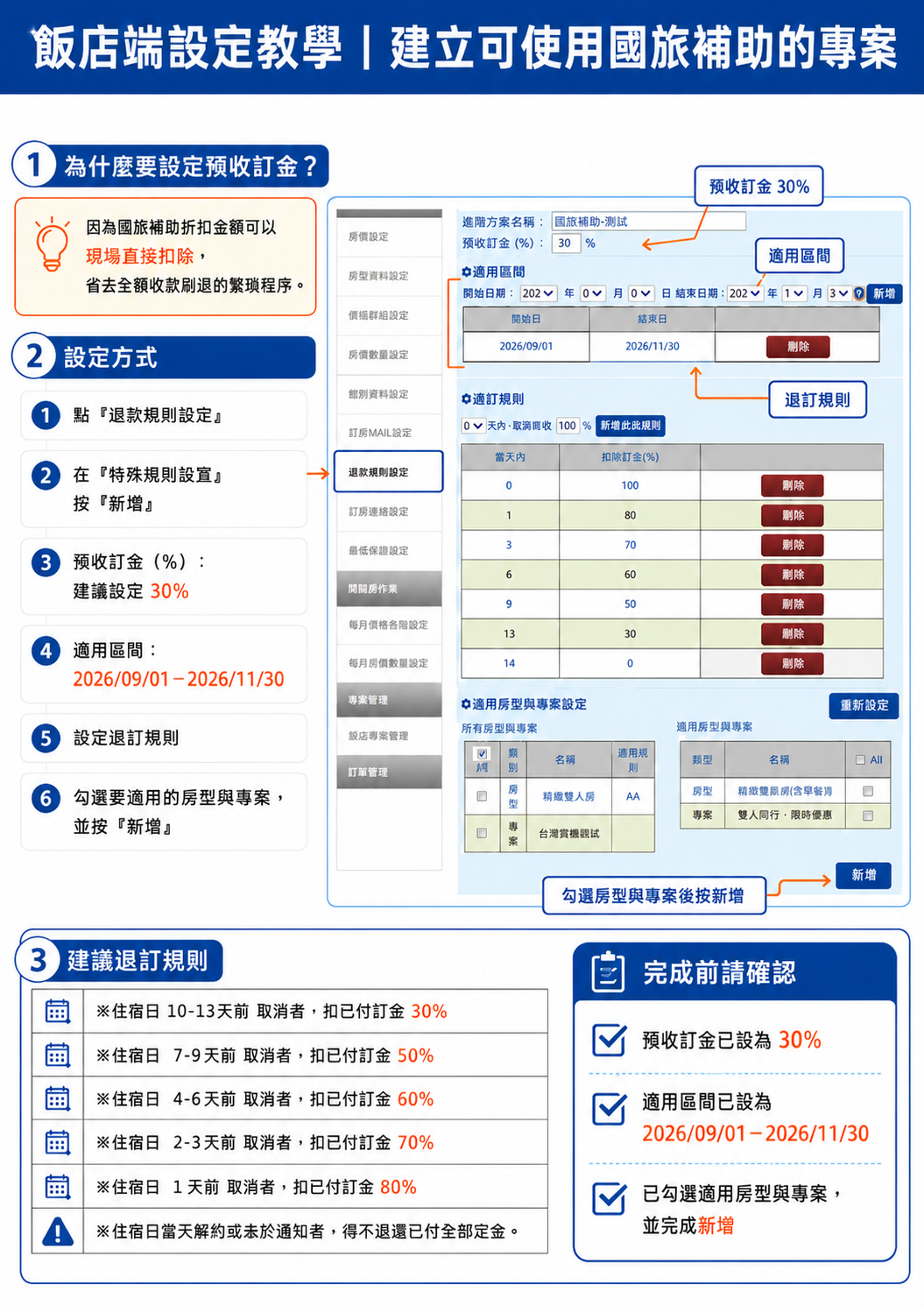
To allow the domestic travel subsidy to be deducted directly from the room rate on the check-in date—avoiding full-amount chargebacks or tedious refund processes—we recommend setting up partial deposit rates instead of collecting full prepayment for subsidy offers. This way, hotels can simply deduct the eligible subsidy amount at check-in and collect the remaining balance.
--- Setup Steps ---
Step 1 | Navigate to "Refund Rules"
In the hotel backend system: Go to Refund Rules → Special Rules Setup → Add New
Create a dedicated set of refund rules specifically for domestic travel subsidy offers.
Please verify the following settings:
· Deposit Rate: 30%
· Validity Period: September 1, 2026 – November 30, 2026
Tip: Name the plan clearly (e.g., "Domestic Travel Subsidy") for easier management and identification.
Step 2 | Set Cancellation Policy for the Subsidy Offer
Set the deposit forfeiture percentage based on the number of days prior to the check-in date:
· 10–13 days prior: 30% of deposit forfeited
· 7–9 days prior: 50% of deposit forfeited
· 4–6 days prior: 60% of deposit forfeited
· 2–3 days prior: 70% of deposit forfeited
· 1 day prior: 80% of deposit forfeited
· Same-day cancellation or No-Show: 100% of deposit forfeited
(Refer to the setup illustration below)
After completing each tier, double-check that the days and forfeiture percentages are correctly set to prevent system calculation errors.
Step 3 | Assign Applicable Room Types and Rate Plans
Once the refund rules are created, scroll down to Applicable Room Types & Rate Plans Setup.
Select the items intended for the subsidy: Applicable Room Types + Applicable Rate Plans
Click Add and verify that the room types and rate plans appear on the right panel. Once confirmed, the setup is complete.
Final Checklist:
· Deposit rate is set to 30%
· Validity period is 2026/09/01 – 2026/11/30
· All cancellation forfeiture tiers are created
· Correct room types and rate plans are selected
· Clicked Add and saved all settings
★ Note: The guide above applies only to merchants handling their own payment collection. If payment is collected on your behalf by Dream Travel Service, please contact support via line: https://lin.ee/vSeFwtx ★
- Drowning in Email, Meetings, and CRM Every Day: Can an AI Assistant Really Help? The New Management Workflow Enabled by Amazon Quick Desktop
- Setup Guide for Domestic Travel Subsidy Package (Collection on Behalf)
- Generative Video Enters Hotel Marketing: How Can Gemini Omni 1.1 Flash Be Used for Short-Form Hospitality Videos?
- Tutorial on Setting Up Domestic Travel Subsidy Special Offer for Hotel Operators
- 2026 Domestic Travel Subsidy Deals (Traveler Edition)