
飯店經理往往把大量時間花在收集決策所需資訊上,而不是直接做出決策:查看郵件、檢查日曆、詢問銷售團隊、搜尋客戶關係管理系統 (CRM) 以及查閱會議記錄。 2026 年 9 月 10 日,AWS 正式發布了 Amazon Quick Desktop,旨在將電子郵件、日曆、CRM、即時通訊和企業資料整合到一個人工智慧工作助理平台中。對於酒店經營者而言,這類工具的價值不在於“又多了一個聊天機器人”,而在於能夠將經理們每天面臨的最分散、最耗時的信息整理工作外包出去。
飯店經理真正缺乏的不是數據,而是先整理數據的人。
飯店經理每天可能需要處理入住率、客人投訴、工程、銷售、宴會、會員計劃、線上旅行社、人員配備和財務等諸多事務。每個部門都有自己的系統和聊天群組,經理的大部分時間都花在了整合各種資訊上。
例如,假設一位重要的企業客戶下午要來洽談年度住宿協議。經理需要了解該客戶的歷史客房入住率、近期投訴情況、合約條款、未完成的後續事項以及今天會議的與會者。這些資訊可能分散在客戶關係管理系統、電子郵件、行事曆和內部文件中。
The direction of enterprise AI assistants such as Amazon Quick Desktop is to let a user say, “Prepare me for this afternoon’s client meeting.” The AI can then pull information from authorized systems, generate a brief, and list the items that require decisions, instead of forcing the manager to open five different windows.
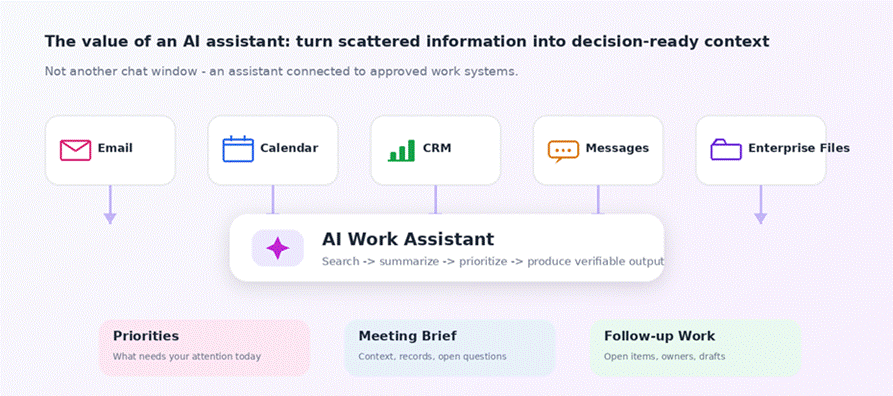
Figure 2 | The core value of an enterprise AI assistant is not simply answering questions, but turning authorized systems into priorities, meeting briefs, and follow-up work.
How This Differs from a Typical ChatGPT Experience: It Connects to Work Context, Not Just Questions
AWS positions Quick as an enterprise-grade AI assistant. In its September 10, 2026 announcement of Desktop general availability, AWS also described a mobile activity feed that integrates Email, Calendar, CRM, and messaging, allowing AI to surface items that need human decisions while routine work is handled in the background.
For hotels, the most important point is not the product brand, but the work model itself. If an AI assistant can read company-approved systems, it can understand “what meetings you have today, what has happened recently with this client, and what still needs follow-up.” That is when the answer becomes meaningfully connected to management work.
But this also makes permissions and data governance more important. A manager’s AI assistant may have access to information across many departments, and convenience cannot become an excuse to assume that all information should be freely shared across systems.
Figure 3 | Three hotel-industry scenarios that are good candidates for early adoption: morning operations briefs, corporate client meeting preparation, and cross-department issue tracking.
Hotel Use Case 1 | The Morning Operations Brief
The old workflow is to open chat groups, occupancy reports, guest complaints, and engineering logs, then ask each department whether anything important is happening today. An AI assistant can first organize today’s occupancy, VIPs, events, major complaints, unresolved engineering items, and important meetings into a pre-morning-meeting brief.
AI handles collection and organization; people still decide what truly matters, how staffing should be adjusted, and whether an issue should be escalated. The potential improvement is that managers spend less time “chasing progress” and more time handling issues that actually require judgment.
The best starting point is to integrate only approved sources first, rather than treating every chat group as an equally reliable source of information.
Hotel Use Case 2 | Preparing for Sales Visits and Corporate Client Proposals
The old workflow is for sales staff to search CRM, historical quotes, Email, stay records, and notes from previous meetings, then organize everything manually. An AI assistant can first produce the client background, collaboration history, unanswered items, and questions that may need clarification.
Sales staff still own pricing, negotiation, and relationship judgment. The potential improvement is more consistent preparation when information about the same client is spread across multiple inboxes and systems.
This is especially valuable for large hotels, banquet sales, and MICE business, because a single client relationship often spans accommodation, food and beverage, meetings, and events.
Hotel Use Case 3 | Cross-Department Issue Tracking
Suppose a guest reports a bathroom leak. The front desk creates a record, engineering opens a work order, housekeeping needs to confirm cleaning, and guest services must follow up on compensation. The old process often depends on chat groups and human memory, creating situations where “everyone assumes someone else will follow up.”
An AI assistant can consolidate the relevant messages and system records, flag unresolved items, and identify the responsible owner. Department managers still confirm accountability and closure. This can reduce broken follow-up across departments.
The key in this scenario is not that AI makes the decision for you, but that fewer things fall through the cracks.
Implementation | Start with One Management Role, Not a Hotel-Wide Rollout
Step one is to select a role with a clear information pain point, such as the general manager, head of sales, or operations manager. Step two is to list the three to five data sources that person checks every day and determine whether they can be connected safely.
Step three is to start with “read-only + organize,” such as meeting preparation, daily briefs, and unfinished-item lists. Do not begin by letting AI automatically send emails, change CRM records, or publish announcements. Step four is to establish data permissions. For example, a general manager may need cross-department access, while a regular salesperson should not see HR or finance details.
Step five is to observe whether the AI output actually reduces the manager’s time spent on information work, or simply creates additional verification work.
Figure 4 | Recommended rollout order: choose a role and approved sources first, begin with “read-only + organize,” then establish permissions and measure impact.
Results and Success Metrics
The most direct KPIs are the amount of time managers spend organizing information each day, meeting preparation time, the number of unfinished cross-department follow-up items, and how often people have to manually search for information again.
You can also measure whether post-meeting follow-ups are completed on time, whether CRM records become more complete, and the percentage of important items that are missed.
Do not use “how many times people ask AI each day” as the success metric. The real value is whether managers can spend the time they save on guests, employees, and operating decisions.
Figure 5 | Success should be measured by whether management friction decreases, not by how many times AI is used each day.
Risks and Considerations
The biggest risk is overly broad access. If an enterprise AI assistant connects to Email, CRM, finance, and internal messaging at the same time, it may be able to see more information than a user needs for their job. Permissions should therefore remain aligned with the original systems and should not be widened simply because AI is involved.
The second risk is incorrect summaries. AI may miss a critical email or misunderstand a conversation, so major decisions should still be checked against the original source. The third risk is automated execution. Actions such as sending email, updating CRM, or creating tasks should be opened gradually, and important external communications should continue to require human confirmation at first.
The final issue is Shadow AI. If the official enterprise tool is difficult to use, employees may still paste company information into personal AI services. An enterprise tool therefore needs to be not only secure, but genuinely convenient.
Figure 6 | Four governance guardrails: least-privilege access, source verification, gradual expansion of automated actions, and reducing the incentive to use Shadow AI.
Conclusion | The First Value of AI in Hotel Management Is Not Replacing Managers, but Removing the Need to Hunt for Information
Attention is one of a hotel manager’s scarcest resources. As Email, meetings, CRM, and operations information continue to grow, the work that most needs automation is not decision-making itself, but the information organization that comes before a decision.
If an enterprise AI assistant can, under the right permissions, organize the things a manager truly needs to pay attention to today, management work can shift from “constantly chasing information” to “making judgments faster.” That is much closer to the kind of AI value hotel operators are likely to feel than simply adding another chat window.
Sources
Title: Amazon Quick is now generally available on desktop
Published by: Amazon Web Services
Authors: Spencer Martenson, Chris Lott, Ramon Lopez
Publication Date: 2026-09-10
Original URL: https://aws.amazon.com/blogs/machine-learning/amazon-quick-is-now-generally-available-on-desktop/
Information referenced in this article: Desktop GA, mobile activity feed, Email / Calendar / CRM / messaging integration, enterprise governance, and AI execution of work.
FAQ
Q: How is this kind of AI assistant different from a regular chatbot?
A: The difference is that, with authorization, it can connect to enterprise work systems and understand the context of meetings, clients, tasks, and documents.
Q: Do I have to let AI automatically send emails or update the CRM?
A: No. It is better to start with read-only access, organization, and drafts, then gradually expand execution permissions.
Q: Who should use it first?
A: General managers, operations managers, or sales managers, because they need to organize information across multiple systems every day.
Q: Could this let AI see too much company data?
A: Yes. Permissions should therefore carry over from the original systems, with unnecessary cross-department access restricted.
Q: How do you know whether the implementation is successful?
A: Look at whether the time managers spend organizing information, preparing meetings, and tracking follow-ups decreases, rather than how often the tool is used.
- Drowning in Email, Meetings, and CRM Every Day: Can an AI Assistant Really Help? The New Management Workflow Enabled by Amazon Quick Desktop
- Setup Guide for Domestic Travel Subsidy Package (Collection on Behalf)
- Generative Video Enters Hotel Marketing: How Can Gemini Omni 1.1 Flash Be Used for Short-Form Hospitality Videos?
- Tutorial on Setting Up Domestic Travel Subsidy Special Offer for Hotel Operators
- 2026 Domestic Travel Subsidy Deals (Traveler Edition)